
Web application development agency
Hardening outbound mail privacy of a self-hosted Postfix mail server
Using standalone email clients such as Thunderbird with a self-hosted Postfix server can greatly reduce your online privacy unless they are configured properly. By default, every email you send reveals your time zone, language, and user agent through the mail client. Then the mail server appends your IP address and hostname. While you cannot prevent other mail servers from logging your mail server’s IP address, you definitely can and should conceal the IP addresses of the machines running the mail clients, along with other information those clients append.
The article is divided into four parts, each covering a single privacy concern. The concerns are sorted by their privacy impact, with the most invasive ones first.
1. IP address and host (Received header)
How an IP address ends up in an email
An email message starts its journey at an email client.
Then the client submits it to a message transfer agent.
It’s the transfer agent that is responsible for equipping the message with its first Received
header:
Received: from [192.168.1.2] (work-pc.internal [192.168.1.2]) by mail.securemail.test
  (Postfix) with ESMTPSA id 5F412980 for <recipient@inbox.test>; Mon, 20 Apr 2026 08:43:41
  +0000 (UTC)
In the example above, from [192.168.1.2] contains the actual source IP of a TCP connection
made between the client and the transfer agent, whereas work-pc.internal [192.168.1.2] comes
from the HELO stage. In this case the client and the transfer agent are both located in the same
private network, hence the private IP.
Subsequently, each transfer agent that processes the message appends the IP address of the previous agent.
Transfer agents don’t do this voluntarily, though; this is dictated by the RFC 5321:
“When an SMTP server receives a message for delivery or further processing, it MUST insert trace (“time stamp” or “Received”) information at the beginning of the message content.
This line MUST be structured as follows:
The FROM clause, which MUST be supplied in an SMTP environment, SHOULD contain both (1) the name of the source host as presented in the EHLO command and (2) an address literal containing the IP address of the source, determined from the TCP connection.”
Concealing an IP
It’s worth noting that it’s neither technically possible nor desirable to completely hide your IP address and send an email truly anonymously: that would lead to complete chaos where it would be impossible to trace where mail comes from and, for example, block malicious servers. Thus, a transfer agent is always able to find out the IP of the connecting party.
What we can and should do, though, is to remove the IP address of the email client (192.168.1.2
in the example above). It’s nobody’s business that your local network has a computer named
john-work-macbook-pro with the private IP of 192.168.1.2.
There is a catch, though: The RFC explicitly prohibits modifying or deleting the Received
header:
An Internet mail program MUST NOT change or delete a Received
However, the notion of alteration becomes fuzzier in case you operate your own mail server (like
I do): it’s the first transfer agent that appends the Received header, so it may be reasonable to
remove that header altogether.
To accomplish this, add
smtp_header_checks = pcre:/etc/postfix/smtp_header_checks
to Postfix main.cf, and then
/^Received: .* with ESMTPSA\b/ IGNORE
to /etc/postfix/smtp_header_checks. The ESMTPSA string denotes an authenticated mail
client submitting via TLS.
An alternative option would be to replace the real values with some bogus ones, but I prefer to stick to full removal for the sake of simplicity.
The next three privacy leaks can be mitigated directly in email clients, either through simple UI toggles or through the config editor. However, for a more robust and centralized solution, server-side configuration is recommended. The additional complexity of server-side configuration will pay off once you start using more than one email client.
2. Time zone (Date header)
User agents are required to include the Date header in all outbound messages. Thunderbird
includes the current time with the local time zone by default, even though the latter is optional
by the RFC standard:
Date: Mon, 01 Jan 1970 00:01:00 +0100
Revealing the time zone does not help privacy, so it’s in our interest to get rid of it. However, for better traceability and potential sorting issues, it’s best to just replace the local time zone with UTC instead of removing it entirely.
Mail client settings
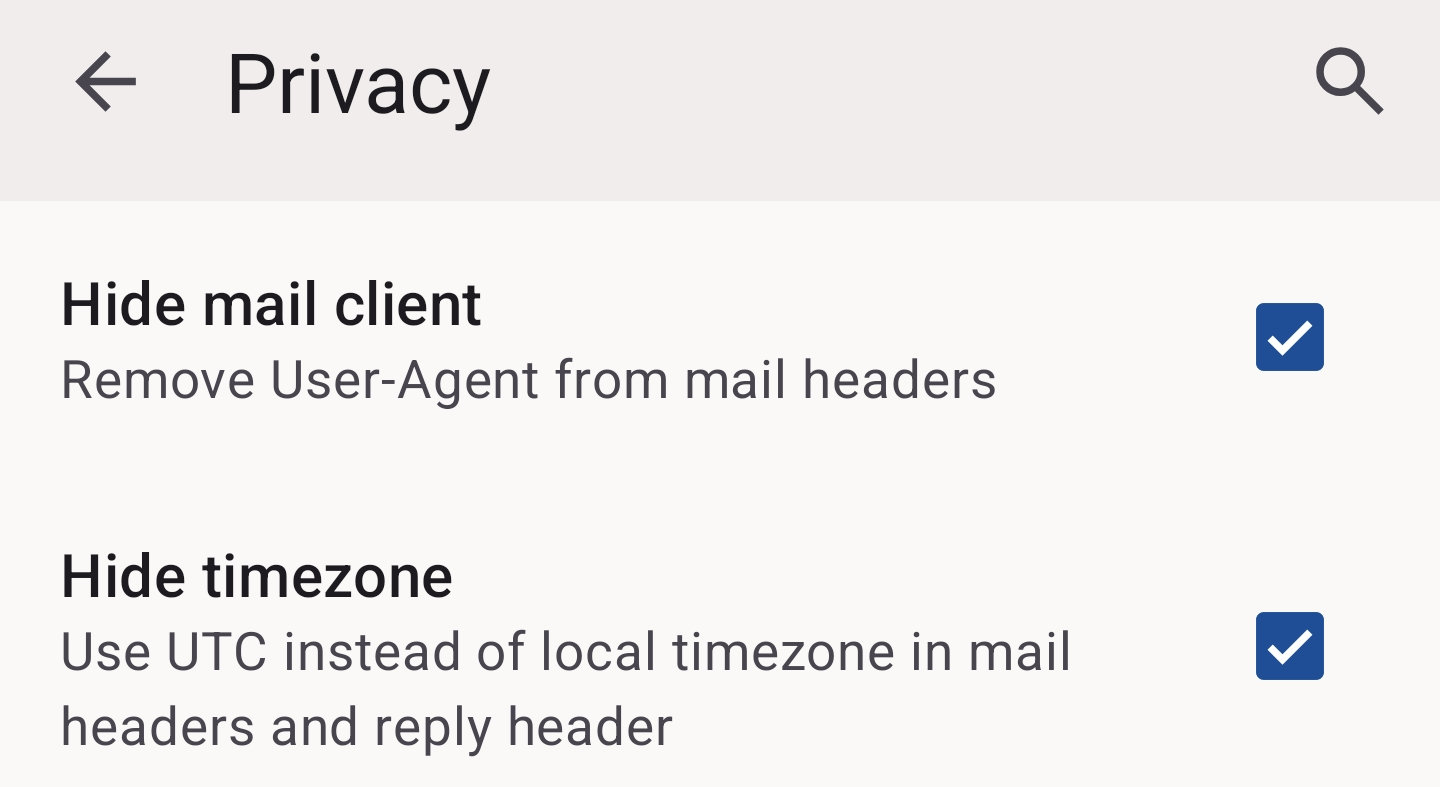
Luckily, Thunderbird can do this out of the box:
- Enable the
mail.sanitize_date_headersetting in Thunderbird Desktop. - Enable the “Hide timezone” UI setting in Thunderbird Mobile (on the screenshot).
After enabling, the time zone will be UTC:
Date: Mon, 01 Jan 1970 00:00:00 +0000.
Server-side Milter
There is a bit more work involved when it comes to a server-side solution: you need a Milter.
In this case, it’s implemented as a Python script that runs as a systemd service. To configure it, first add
smtpd_milters = inet:127.0.0.1:8892 to Postfix main.cf. Then create the following files:
/usr/local/bin/utc-date-milter.py
#!/usr/bin/env python3
import sys
import Milter
from email import utils

class UTCDateMilter(Milter.Base):
    def __init__(self):
        super().__init__()
        self.utc_date = None

    def header(self, name, value):
        if name.lower() == 'date':
            self.utc_date = value
        return Milter.CONTINUE

    def eoh(self):
        if self.utc_date:
            try:
                t = utils.parsedate_tz(self.utc_date)
                if t:
                    timestamp = utils.mktime_tz(t)
                    self.utc_date = utils.formatdate(timestamp, usegmt=True)
            except Exception:
                pass
        return Milter.CONTINUE

    def eom(self):
        if self.utc_date:
            try:
                self.chgheader('Date', 0, self.utc_date)
            except Exception:
                pass
        return Milter.CONTINUE


if __name__ == "__main__":
    Milter.factory = UTCDateMilter
    sys.exit(Milter.runmilter("utc-date-milter", "inet:8892@127.0.0.1", 300))
/etc/systemd/system/utc-date-milter.service
[Unit]
Description=UTC Date Header Milter
After=network.target
Before=postfix.service

[Service]
Type=simple
RuntimeDirectory=utc-date-milter
RuntimeDirectoryMode=0755
ExecStart=/usr/bin/python3 /usr/local/bin/utc-date-milter.py
Restart=always
RestartSec=1
User=postfix
Group=postfix
StandardOutput=journal
StandardError=journal

[Install]
WantedBy=multi-user.target
3. Language (Content-Language header)
“A concern with language ranges is that they may be used to infer the nationality of the sender and thus identify potential targets for surveillance.” — RFC3282
- Thunderbird Desktop adds the
Content-Languageheader and fills it with the languages enabled for spell checking (the checkboxes under Settings › Composition › Spelling › Language in UI). Luckily, it can also be disabled by themail.suppress_content_languagesetting in config editor. - Thunderbird Mobile does not add the
Content-Languageheader at all. - In Postfix, it’s as simple as adding
/^Content-Language:/ IGNOREto/etc/postfix/smtp_header_checkswe have created earlier.
4. User agent (User-Agent header)
While being the least concerning leak, it might still be worth dealing with in order to minimize the fingerprint. As with the time zone and language, you can either configure each client separately, or rely on a centralized Postfix config:
- Thunderbird Desktop: Disable the
mailnews.headers.sendUserAgentsetting. - Thunderbird Mobile: Enable the “Hide mail client” UI setting (on the screenshot above).
- In Postfix, add
/^User-Agent:/ IGNOREto/etc/postfix/smtp_header_checks.
Notes
The described techniques have been tested at least with Postfix 3.10 and Thunderbird 150.
You may need to perform additional actions, such as reloading Postfix, starting a systemd service, or tuning some other configuration files, in order to have a fully working setup.
Also, make sure the configuration instructions above are fully scripted, for example with Ansible, so deployment to a new server requires no manual steps.
Posted on: 07 May 2026.
Tags: email, privacy, leak, ip, time zone, language, user agent, fingerprint, self-hosted, postfix, thunderbird